
Video Collaboration
Summary
Facilitate editing collaboration by eliminating tedious review spreadsheets and notes.
Editors we spoke with did not want to manage and maintain highly detailed spreadsheets with editing notes.
We were interested in how we might move editors and teams to efficient online and offline editing review workflows.
Additionally, there was interest in seeing if we could aid in the daily review process for shoots on location.
Senior Product Designer (UX) and Researcher
Video editors (collaboration workflows); 20 research participants
Small cross-functional team; worked with internal stakeholders and users
Proto-personas, interviews, contextual inquiry, ideation, task flows, moderated testing (including 5 external users)
The Problem
Editors needed to collaborate during editing and review, but the workflow relied on analog tools and tedious written review spreadsheets and notes.
That made collaboration slow, inconsistent, and hard to coordinate across offline creative work and online finishing.
With funding tight, we had to leverage existing research activities, keep scope focused, and still deliver an experience editors would trust.
The Outcome
Shipped in six months from concept to completion, plus one month for App Store release.
Replaced spreadsheet-heavy and analog collaboration with a clearer offline and online workflow aligned to how editors actually work.
Enabled remote daily footage review by pairing to a Vegas Pro workstation over TCPIP and accessing project media bins backed by server-hosted footage.
Reduced adoption risk by aligning the UI and interaction patterns to Catalyst Edit conventions.
Earned internal stakeholder sign-off to release the app for free as the company’s first app on the Apple App Store.
Reached 3,000 downloads in the first two months after release.
Kickoff
Discovery
Ideation
Testing
Kickoff
Reviewed proto-personas with the team and aligned on a primary persona.
Reached consensus on project objectives and scope.
Takeaway
Qualitative user research was essential.
Created a research plan and updated the interview protocol. Incorporated team feedback and secured approval.
I wanted to leverage ongoing research activities, but funding was tight. That meant the team was small and the scope needed to stay focused.
Confirmed the primary persona was already included in ongoing research.
That let us explore collaboration within existing research. I updated the interview protocol and we were ready to go.
Kickoff
Discovery
Ideation
Testing
Research
For this project, I used proto-personas to help screen research participants.
I interviewed users and conducted contextual inquiry with 20 participants.
Our guiding questions were:
Did editors collaborate to deliver projects?
Why did they need to collaborate?
How did they collaborate, and why?
How often did they collaborate, and why that often?
What We Learned
Several of our assumptions were wrong in the proto-personas.
Key takeaways:
The "Michael Schultz" persona was more risk-averse than expected, change resistance was higher than anticipated, and collaboration relied heavily on analog tools.
These conversations surfaced themes, insights, and opportunity areas—and became the foundation for user goals and a deeper understanding of how editors work.
With this research complete, we iterated the proto-personas into a more finished state.
Opportunity Areas
From conversations with editors, themes started to emerge.
Synthesized themes into insight statements that drove our “How might we” questions.
Results
The team gravitated toward the theme of collaboration.
Prioritized: How might we help Michael Schultz collaborate during editing?
A developer reviewed the research and pitched a product idea that gained traction.
It directly addressed Michael’s collaboration challenges.
He pitched an iOS app that supported both online and offline editing collaboration by allowing editors and others involved in the production to review footage and leave detailed comments/notes on media via timeline markers.
Kickoff
Discovery
Ideation
Testing
Brainstorm
The brainstorm session was led by a developer who was inspired by the research.
I participated in and helped facilitate the ideation session.
After the session completion, I took the notes and worked up a mind map to represent a rough idea of features that we could continue to work on with the development team.
Outcome
From this session, I identified the core screens and a proposed initial information architecture.
Documented the screens and proposed IA.
Information Architecture
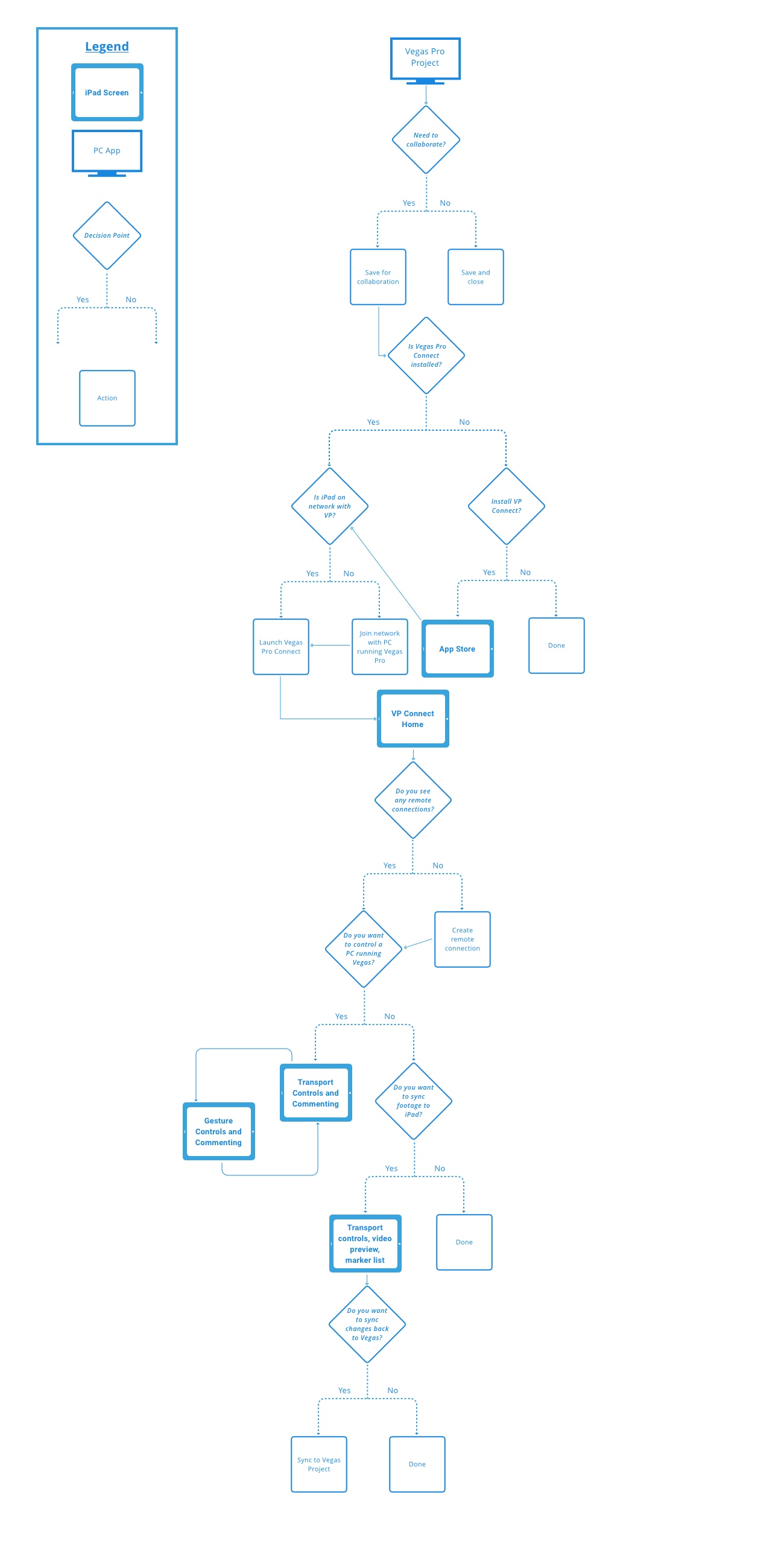
Went back to users to vet key scenarios. This helped identify the discrete tasks requires and how to organize them.
Created task flows to support those scenarios and validated them with both the team and users.
.png)
Conclusions
Through testing with stakeholders and users, we proposed several versions of the app’s organization.
Tested task flows with 5 external users and validated the main user scenarios.
Kickoff
Discovery
Ideation
Testing
Proposed Versions
Tested these with external users and internal stakeholders. All sessions were moderated, in person, and on-site.
Internal testing happened weekly in a 30-minute session.
Invited anyone interested in testing, handed them a device, and gave them a task to complete.
Afterward, they were encouraged to explore and share feedback.
What We Learned
Summarized Findings:
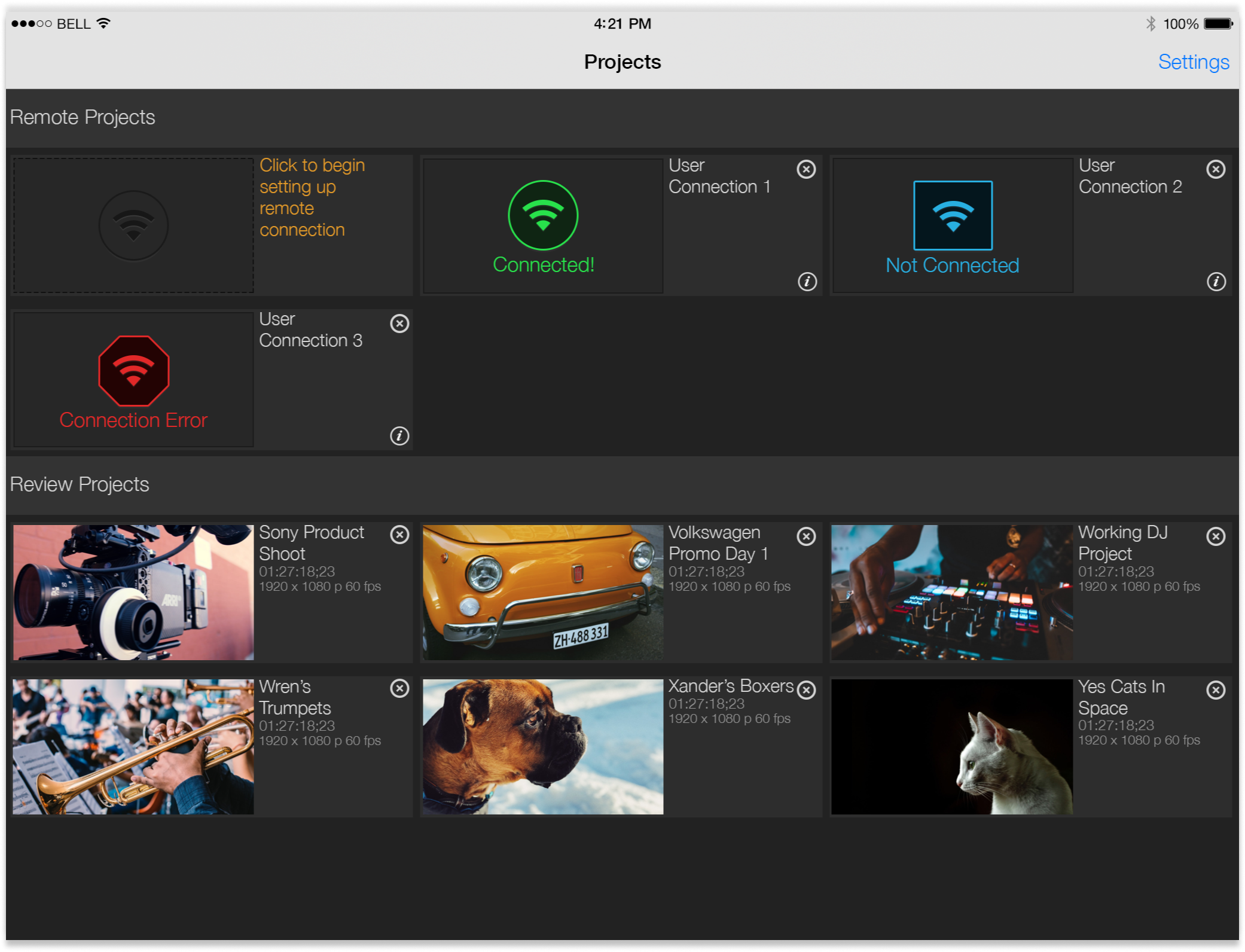
- Maximizing space to display project thumbnails was preferred.
- A large, visible target to start setting up a remote connection was easier to find than an icon button.
- Users loved the remote-control capability for online editing, and gesture control felt novel.
- The initial connection flow to a networked video editor instance could be smoother.
Design changes:
- Iterated to show both online and offline modes on the home screen.
- Settled on a hub-and-spoke navigation model.
- Aligned gestures as closely as possible to established interaction guidelines; many small changes were needed.
- Aligned the visual design system with the company’s video editing suite.
- Expanded the content model to include additional project metadata.
Current Version
This is the resulting version.
I’m incredibly proud of what the team produced on a tight timeline, with no real budget for research or user testing.
Shipped a product that was well received, on time, and under budget.
2
Rounds of
User Testing
58
Iterations
3000+
Downloads
1st
iOS App
